Troubleshoot EVPN
Troubleshooting EVPN
This is a page which shows some troubleshooting tips for EVPN. The strategy I like to use is “Local,Spine,Remote”, or ‘LSR’ to make it easy to remember. Before you get too far into the weeds, always first verify that you have BGP & EVPN neighborships. The below steps are useless if you do not have those fundamental pieces in place.
Troubleshooting EVPN has similar steps to troubleshooting standard networking problems. We are still looking for MAC addresses and IP addresses being learn in the correct places. The real thing that has changed here is that we need to also check that the important bits of information we are after do exist in the EVPN soup. There are commands to check this though, so lets have a look at them.
Local
Here are things to check locally;
- Ensure that we learn the mac address on the ports and vlans we expect. Here, you can see that we’ve learnt a device with mac address 5000.00f6.ad37 for vlan 10. Note that we also see an entry with Ports=VX1, which means we are learning remote mac addresses too. Nice! This indicates we have some remote reachability, but lets ignore it for now and keep going with the exercise.
Leaf1#show mac address-table vlan 10
          Mac Address Table
------------------------------------------------------------------

Vlan    Mac Address       Type        Ports      Moves   Last Move
----    -----------       ----        -----      -----   ---------
  10    001c.7300.0099    STATIC      Cpu
  10    5000.001b.5e8d    DYNAMIC     Vx1        1       0:01:31 ago
  10    5000.0072.8b31    STATIC      Po100
  10    5000.00f6.ad37    DYNAMIC     Po1        1       0:01:32 ago
Total Mac Addresses for this criterion: 4

- Let’s also check to ensure that we are learning the IP address of the host. We do this by checking for arp, but under evpn, instead of the ‘Interface vlan’ as we would in a non-evpn network.
No ARP Entry on int-vlan-10
Leaf1#show arp interface vlan 10
Address         Age (sec)  Hardware Addr   Interface
Leaf1#
ARP Entry shown under EVPN
Leaf1#show bgp evpn arp
VLAN  Label  Encap IP                 MAC             Tunnel Endpoint    Seq#
----- ------ ----- ------------------ --------------- ------------------ ------
10    10010  VXLAN 10.100.10.11       5000.001b.5e8d  4.4.4.4            -
10    10010  VXLAN 10.100.10.11       5000.001b.5e8d  4.4.4.4            -
10    10010  VXLAN 10.100.10.10       5000.00f6.ad37  Local              -
- Now that we have confirmed we are learning the Mac Addresses and IP addresses where we want them to be learnt (vlan10 for MAC, EVPN-ARP for IP) , we need to make sure that EVPN is putting the MAC Address & IP Address into the EVPN soup. We can do this by making sure it is creating a Route-Type2 for that vlan entry.
Leaf1#show bgp evpn route-type mac-ip
BGP routing table information for VRF default
Router identifier 1.1.1.1, local AS number 65001
Route status codes: * - valid, > - active, S - Stale, E - ECMP head, e - ECMP
                    c - Contributing to ECMP, % - Pending best path selection
Origin codes: i - IGP, e - EGP, ? - incomplete
AS Path Attributes: Or-ID - Originator ID, C-LST - Cluster List, LL Nexthop - Link Local Nexthop

          Network                Next Hop              Metric  LocPref Weight  Path
 * >Ec    RD: 65003:10010 mac-ip 5000.001b.5e8d
                                 4.4.4.4               -       100     0       65000 65003 i
 *  ec    RD: 65003:10010 mac-ip 5000.001b.5e8d
                                 4.4.4.4               -       100     0       65000 65003 i
 * >Ec    RD: 65003:10010 mac-ip 5000.001b.5e8d 10.100.10.11
                                 4.4.4.4               -       100     0       65000 65003 i
 *  ec    RD: 65003:10010 mac-ip 5000.001b.5e8d 10.100.10.11
                                 4.4.4.4               -       100     0       65000 65003 i
 * >      RD: 65001:10010 mac-ip 5000.00f6.ad37
                                 -                     -       -       0       i
 * >      RD: 65001:10010 mac-ip 5000.00f6.ad37 10.100.10.10
                                 -                     -       -       0       i
From looking at the bottom 2 entries, Leaf1 is sending a MAC of the host, and MAC-IP route-type2 into the EVPN soup, which is what we want to see.
If you don’t see the Mac Address in the EVPN Soup, ensure you have Redistribute learned under the mac-vrf
Ok, now that we’ve verified things look good locally, let’s go to the Spine to investigate.
Spine
Let’s move onto investigating the Spine. Here, we are looking for the following key pieces of information:
- Mac Addresses of the host are being learnt
- IP addresses of the host are being learnt
- A RD (Route Distinguisher) is shown to ensure uniqueness
- An AS path exists to reach the host.
The command to get the information is:
show bgp evpn vni xxxxxx
where xxxxx is the vni that the vlan was mapped to under the vxlan interface. If you don’t know what that is, have a look for it on the leaf. This is a good time to ensure that the VNI’s match between Leaf switches.
Spine1#show bgp evpn vni 10010
BGP routing table information for VRF default
Router identifier 5.5.5.5, local AS number 65000
Route status codes: * - valid, > - active, S - Stale, E - ECMP head, e - ECMP
                    c - Contributing to ECMP, % - Pending best path selection
Origin codes: i - IGP, e - EGP, ? - incomplete
AS Path Attributes: Or-ID - Originator ID, C-LST - Cluster List, LL Nexthop - Link Local Nexthop

          Network                Next Hop              Metric  LocPref Weight  Path
 * >      RD: 65003:10010 mac-ip 5000.001b.5e8d
                                 4.4.4.4               -       100     0       65003 i
 * >      RD: 65003:10010 mac-ip 5000.001b.5e8d 10.100.10.11
                                 4.4.4.4               -       100     0       65003 i
 * >      RD: 65001:10010 mac-ip 5000.00f6.ad37
                                 1.1.1.1               -       100     0       65001 i
 *        RD: 65001:10010 mac-ip 5000.00f6.ad37
                                 2.2.2.2               -       100     0       65001 i
 * >      RD: 65001:10010 mac-ip 5000.00f6.ad37 10.100.10.10
                                 1.1.1.1               -       100     0       65001 i
 *        RD: 65001:10010 mac-ip 5000.00f6.ad37 10.100.10.10
                                 2.2.2.2               -       100     0       65001 i
 * >      RD: 65001:10010 imet 1.1.1.1
                                 1.1.1.1               -       100     0       65001 i
 * >      RD: 65001:10010 imet 2.2.2.2
                                 2.2.2.2               -       100     0       65001 i
 * >      RD: 65003:10010 imet 4.4.4.4
                                 4.4.4.4               -       100     0       65003 i
In the above output, we are querying VNI 10010, which is what we had vlan10 mapped to. In the output, we can see that we are learning the Mac Address of the host which we learned from the first step, and also it’s IP address. We also see a valid path to get to it (65001). Finally, we see that there is a RD to ensure uniqeuness of that Mac + Mac-IP as it floats through the EVPN soup.
Eagle-eyed viewers will also note that we learn the remote-hosts MAC + MAC-IP here as well, which is also great.
If colour-coding helps, i’ve included a screenshot of the above output.

If you have multiple spines, ensure they all have the same information.
Remote
Now that we’ve verified the MAC + MAC IP have been learnt by the local leaf, and are correctly floating in the soup, we can check the remote switch to ensure it’s seeing the same.
Let’s check:
- Mac Address
- MAC-IP
Again, lets verify mac address.
Leaf4#show mac address-table vlan 10
          Mac Address Table
------------------------------------------------------------------

Vlan    Mac Address       Type        Ports      Moves   Last Move
----    -----------       ----        -----      -----   ---------
  10    5000.001b.5e8d    DYNAMIC     Et4        1       0:04:01 ago
  10    5000.00f6.ad37    DYNAMIC     Vx1        2       0:04:01 ago
Total Mac Addresses for this criterion: 2

          Multicast Mac Address Table
------------------------------------------------------------------

Vlan    Mac Address       Type        Ports
----    -----------       ----        -----
Total Mac Addresses for this criterion: 0
We can see that we are learning the mac address of the remote host throught the VXLAN interface, which is fantastic. This proves our L2 connectivity. Let’s continue to verify, and check MAC-IP
Leaf4#show bgp evpn summ
BGP summary information for VRF default
Router identifier 4.4.4.4, local AS number 65003
Neighbor Status Codes: m - Under maintenance
  Neighbor V AS           MsgRcvd   MsgSent  InQ OutQ  Up/Down State   PfxRcd PfxAcc PfxAdv
  5.5.5.5  4 65000            138       129    0    0 01:28:10 Estab   9      9      3
  6.6.6.6  4 65000            178       191    0    0 01:24:37 Estab   9      9      14
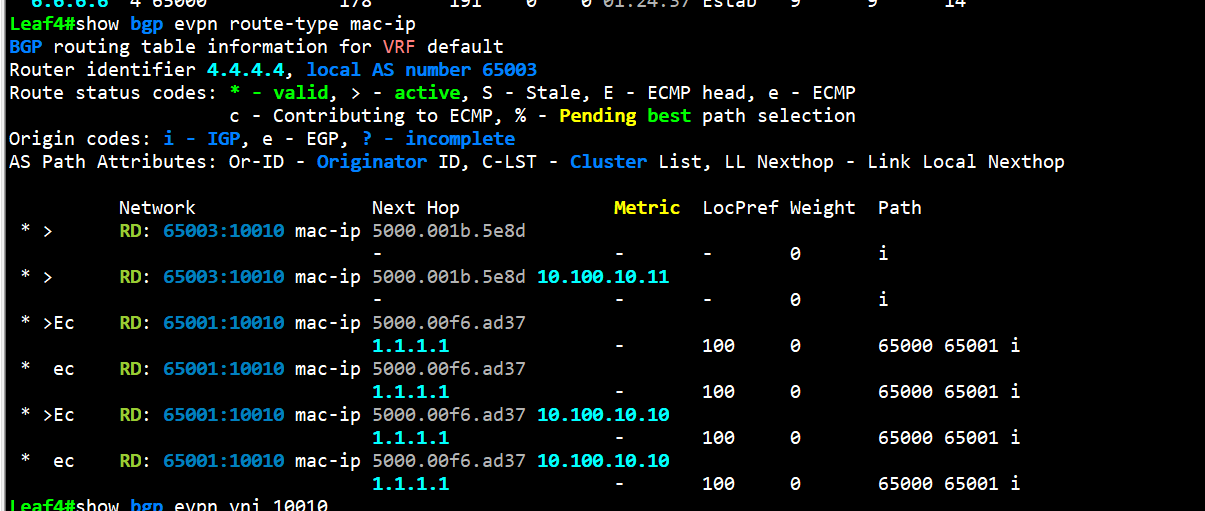
Leaf4#show bgp evpn route-type mac-ip
BGP routing table information for VRF default
Router identifier 4.4.4.4, local AS number 65003
Route status codes: * - valid, > - active, S - Stale, E - ECMP head, e - ECMP
                    c - Contributing to ECMP, % - Pending best path selection
Origin codes: i - IGP, e - EGP, ? - incomplete
AS Path Attributes: Or-ID - Originator ID, C-LST - Cluster List, LL Nexthop - Link Local Nexthop

          Network                Next Hop              Metric  LocPref Weight  Path
 * >      RD: 65003:10010 mac-ip 5000.001b.5e8d
                                 -                     -       -       0       i
 * >      RD: 65003:10010 mac-ip 5000.001b.5e8d 10.100.10.11
                                 -                     -       -       0       i
 * >Ec    RD: 65001:10010 mac-ip 5000.00f6.ad37
                                 1.1.1.1               -       100     0       65000 65001 i
 *  ec    RD: 65001:10010 mac-ip 5000.00f6.ad37
                                 1.1.1.1               -       100     0       65000 65001 i
 * >Ec    RD: 65001:10010 mac-ip 5000.00f6.ad37 10.100.10.10
                                 1.1.1.1               -       100     0       65000 65001 i
 *  ec    RD: 65001:10010 mac-ip 5000.00f6.ad37 10.100.10.10
                                 1.1.1.1               -       100     0       65000 65001 i
Take an opportunity to notice the AS Path for the remote host. We can see that the AS Path for 10.100.10.10 (the remote host) is 65000, 65001. This is what we expect to see. 65000 is the Spine, and 65001 is the AS of Leaf1.
Other Troubleshooting
If you know the remote leaf’s address that you expect to be learning a route/mac from, you can check that from your local leaf by using the “show bgp evpn next-hop x.x.x.x” command. In the below image, we can see that we learn the remote-host mac address and it’s ip address. This is a “shortcut” for the above troubleshooting, but it does contain less information.

You can search the vxlan address table to see Mac addresses learnt by remote leaves. If your local lead can see it, then it stands to reason that you should be learning it as well.

Summary
To summarize these steps:
- LSR (Local, Spine, Remote)
- Make sure you learn mac addresses + IP addresses locally (ARP under the EVPN)
- Make sure the Spine can see the MAC addresses floating in the EVPN soup
- Make sure the remote leaf can see the Mac & Mac-IP, and also learns the remote host in the appropriate mac address table.